Honestly, living in a big city, it’s easy to take electricity for granted. You flip a switch, and the room glows. But when a power outage hits, it’s like someone pulled the rug out from under your routine. Elevators stop, Wi-Fi blinks out, and even the hum of your fridge disappears. You might be wondering if you should reset alarms, check on neighbors, or just wait for things to sort themselves out. Here’s the thing: a little know-how goes a long way. You don’t need to turn into a survival expert, but a calm plan can help you handle things safely and comfortably—no matter which floor your apartment’s on or how long the outage lasts.
Let me show you what to do, step by step, whenever the power goes out in 60601. Whether you’re dealing with a short blip or a longer, stormy wait, you’ll feel more in control (and less in the dark).
First Steps When the Power Goes Out
The moment you notice the power’s gone, your brain probably fires off two questions: *Is it just me, or is the whole block out?* and *What should I do first?* Right off the bat, it’s important to stay calm and take a quick look around. If you’re in a high-rise or a building with elevators, take a breath. Losing patience and racing for the stairs won’t solve anything—especially if you’re stuck inside.
Tip: Don’t fuss with your circuit breakers right away unless you’re sure it’s just your unit. Sometimes the problem is bigger than a tripped switch.
Here’s what you can do right away:
- Check your surroundings. Are your neighbors’ lights out too? Peek through your peephole or out the window. If the streetlights or common areas are dark, it’s probably a building-wide or neighborhood issue.
- Avoid using elevators. If the outage just began, don’t try hopping in one to “get out”—they may get stuck between floors.
- Grab a flashlight or use your phone’s light. Just don’t drain your phone battery unless you really need to. Save your phone’s juice for emergencies or updates.
If it seems like the entire block is out, skip the DIY troubleshooting on your circuit panel for now. The issue is likely with the main grid—so resetting won’t help. If it’s only your apartment, you might have tripped a breaker, and that’s when a quick reset might be all you need.
How To Stay Safe and Comfortable Indoors
Safety is the name of the game during any power outage, especially in big buildings. When everything goes dark, hazards you didn’t think about start showing up. Here’s what you should focus on to keep things under control.
Insight: The most important thing? Stay visible and steer clear of unnecessary risks—especially with candles or open flames.
To make sure you’re safe:
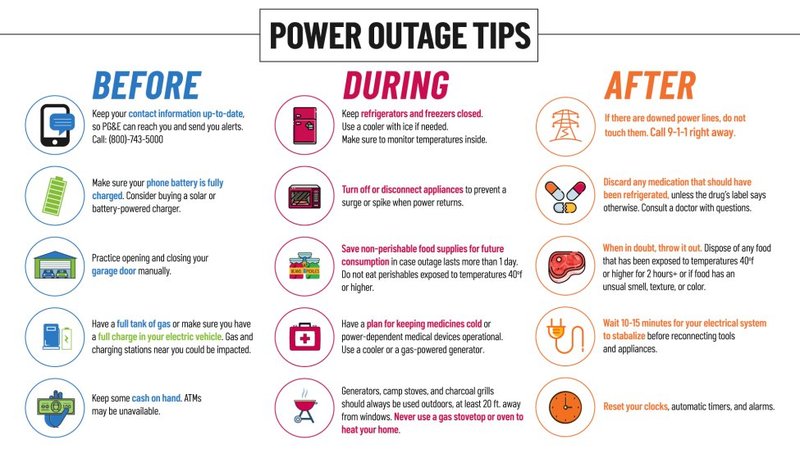
- Unplug electronics. When the power returns, surges can fry your laptop, TV, or gaming console. If you’ve ever dealt with a blown fuse or a glitchy remote after a surge, you know it’s not fun troubleshooting later.
- Avoid candles, if possible. Battery-powered lanterns or LED flashlights are much safer, especially in apartments. If you have to use a candle, keep it away from curtains and never leave it unattended.
- Keep the fridge closed. Every time you open the refrigerator, cold air escapes—so your food will spoil faster. Trust your gut: unless you absolutely need to dig around for food, just let it be.
- Check in on vulnerable neighbors. If you know someone elderly or with mobility challenges in your building, a quick call or a knock can mean a lot. Sometimes, remote-controlled doorbells or alarms stop working during a power cut, so don’t rely on tech alone.
Staying comfortable can feel like a puzzle, especially if the outage lasts longer. Dress in layers if it’s cold, and drink water—sometimes, the urge to stress-eat or pace around is strong, but keep your routines as normal as you can.
How To Get Information and Updates
Being in the dark is one thing—being in the dark *about* what’s happening is another. In 60601, you’re probably used to getting real-time info online, but a power outage can make that tricky. Here’s how to keep up with updates (even if your Wi-Fi’s out).
Pro tip: Your phone is your lifeline, but battery life isn’t endless. Use it wisely!
- Use your phone for essential updates. Go to local utility websites—like ComEd—for outage maps and estimated restoration times. Social media can also be useful for real-time info, but beware of rumors or unofficial updates.
- Sign up for emergency alerts in advance. Chicago’s Office of Emergency Management has opt-in alerts that can reach you by text or email. These can be invaluable during storms or major outages.
- Consider a portable radio. It might sound old school, but a battery-powered or hand-crank radio can connect you to emergency broadcasts if everything else fails. It’s worth having one tucked away for situations like this.
- Save battery by avoiding streaming and games. If you need to conserve your phone’s power, stick to text-based updates and turn on battery saver mode.
Let me explain why this matters: waiting around without info can make it easy for panic to set in. Solid, official updates help you know whether you’re dealing with a quick blip or something more serious, like a big storm or a grid malfunction.
Troubleshooting: Is It Just You or the Whole Building?
Sometimes, it’s hard to tell if a power outage is isolated to your apartment or if it’s a building-wide (or even city-wide) issue. Here’s a straightforward way to troubleshoot before calling in the cavalry.
Start by checking if any appliances or outlets in your home still work. If certain rooms have power, you may have tripped a circuit. Head to your circuit breaker panel—typically found in a closet or hallway. If you notice one switch flipped the wrong way, just reset it by flipping it all the way off and then back on. That might sync your apartment’s power back to the main flow.
But if everything’s out, including common areas and hallway lights, it’s a bigger deal—probably outside your control. Don’t spend time fiddling or trying to pair individual devices back to power. Instead:
- Contact your landlord or building management. They may already know, but it doesn’t hurt to check in and ask for updates.
- Report the outage to your electric utility. For the 60601 area, that’s often ComEd. Use their website or phone line to log your address—you might be helping them spot the outage faster.
- Wait for official communication. If you’ve done all your troubleshooting and nothing works, it really is just a matter of waiting.
Don’t forget: Trying to reset or code anything beyond your personal circuit breakers usually won’t fix a bigger outage. Let the pros handle it.
How to Prepare for Next Time
After the lights come back, you might feel tempted to forget the whole thing. But here’s the truth: prepping ahead makes the next outage a lot less stressful. Picture it like syncing a new remote before the batteries finally run out—better to do it ahead of time, right?
- Build a basic outage kit. This isn’t just for doomsday preppers! Keep flashlights, extra batteries, a first-aid kit, and a portable power bank ready. Toss in some snacks that don’t need cooking, like granola bars or canned fruit.
- Keep devices charged. Don’t let your phone drop below 40% battery if there’s stormy weather in the forecast. And if you need to reset clocks or alarms after an outage, jot down the steps or keep a manual handy.
- Know your building’s emergency plan. Some high-rises have backup generators or specific instructions for long outages. Ask your property manager or look for posted info in common areas.
- Make a contact list. Gather important phone numbers—building management, ComEd, local non-emergency services—in your phone and on paper. If your phone dies, you’ll still have what you need.
Frankly, a little planning means fewer headaches when the power does go out. Think of it as pairing a universal remote—you’ll be ready no matter what comes your way.
Managing Food and Water During an Outage
There’s a good chance you’ll worry about what’s going to happen to everything in your fridge and freezer. Let’s break it down simply: your fridge is basically an insulated box. As long as you keep the doors shut, it’ll stay cold for a while—even without power.
Here’s what you need to know:
- Refrigerators keep food cold for about 4 hours. Freezers can last 24–48 hours if unopened. So, avoid opening them unless absolutely necessary.
- When in doubt, throw it out. If food has been above 40°F for more than two hours, it’s safest to toss it. No one wants food poisoning, especially during an outage when everything else is harder to deal with.
- Use perishable items first. Eat what might spoil soonest, then move on to pantry snacks.
- Water is usually safe in urban Chicago, since the city’s water supply isn’t directly affected by short-term power cuts. But for long outages, filling a few bottles just in case isn’t a bad idea.
Pro insight: If you have to reset a digital fridge or appliance after the power returns, check the manufacturer’s instructions for sync or troubleshooting steps—sometimes, they need a manual reset to start cooling again.
What To Do If There’s a Medical Emergency
A power outage gets scarier if someone relies on electric-powered medical equipment. Don’t panic—just follow some simple backup steps.
- Contact building staff or emergency services. Let them know about your needs if backup power is available or if you need assistance.
- Use backup batteries or portable power sources if you have them. Keep these charged and ready for just such situations.
- Have a plan for evacuation. If your building has elevators that are down, and someone can’t use stairs, contact non-emergency services (like Chicago’s 311) or alert emergency responders if it’s critical.
- Keep an updated medical kit handy. It should include any medications, instructions for care, and doctor contact info.
It’s tough to think about these scenarios, but planning beats scrambling when things are stressful.
After the Power Comes Back: What Next?
It’s a relief when the lights flicker back on—but don’t just jump back into your routine. There are a few things you should do to make sure everything’s truly back to normal.
- Wait before plugging everything in at once. Power surges can happen when the grid restarts. Give your electronics a few minutes before plugging them all in so you don’t overload the system (or risk frying a device).
- Check your fridge, freezer, and appliances. If something isn’t working, you may need to code, reset, or sync the device. Sometimes, digital clocks or smart remotes need to be paired again to the main system.
- Test smoke and carbon monoxide detectors. Many are battery-powered, but some plug into the wall. Make sure they’re all working properly after the outage.
- Reset clocks and alarms. Even your oven timer or coffee maker might need a quick reset now. It’s a simple step, but it can save confusion the next morning!
Remember: If any appliances seem off, make a note to troubleshoot or contact building maintenance for help. Small glitches sometimes show up hours after the outage is over.
Wrapping It Up
Power outages in zip code 60601 can be frustrating, but the key is to keep calm, think things through, and rely on a few practical steps. Whether you’re resetting your remote, syncing devices after a surge, or just waiting out the dark, being prepared gives you more control—and a lot less to worry about. Keep a flashlight handy, know your building’s plan, and you’ll be equipped to handle whatever comes your way. After all, things always feel a little brighter when you know what to do next.

