Here’s the thing: Whether the lights flicker for an hour or a hurricane blows through and you’re out for days, you don’t have to feel powerless (pun intended). Most of us in Charleston rely on power, but few are really prepared for when it vanishes. So, let’s roll up our sleeves and talk through step-by-step what to do during a power outage in zip code 29401. I’ll make sure you’re not just stumbling around in the dark—literally and figuratively.
First Steps When the Power Goes Out
The moment your lights go out, your first instinct might be to panic—or maybe just stare at your now-useless TV remote, wondering if someone hit the wrong button. But before you do anything, take a breath. The smartest first move is to check whether the outage is just you or your whole block.
Look outside: Are the streetlights or your neighbor’s porch lights also out? If everything’s dark, it’s probably a wider issue. But if it’s just you? That’s a clue you might have tripped a breaker or blown a fuse. Go to your circuit breaker box and check for any switches that are flipped to the “off” position. Gently reset them one by one.
Still nothing? Now’s the time to grab your phone (use the flashlight feature!) and call your power company—here in 29401, it’s usually Dominion Energy. Don’t just assume someone else will report it; the more reports they get, the faster they can pinpoint the problem. Save their outage hotline in your phone so you’re ready next time.
Finally, unplug major electronics—think your TV, gaming systems, or that fancy universal remote you just got. Power surges can damage sensitive devices when electricity comes back.
Staying Safe in a Power Outage
Safety comes first—especially in older buildings, which are plentiful downtown in zip code 29401. Power outages can cause all sorts of sneaky problems, from spoiled food to house fires. The most important rule? Don’t light every candle in the house like you’re throwing a medieval feast. Instead, stick to flashlights, battery-powered lanterns, or those nifty little LED puck lights you can stick anywhere.
If you have to use candles, keep them far from curtains, paper, or anything flammable. Never leave a candle burning if you leave the room. It sounds obvious, but honestly, it’s easy to forget when you’re distracted trying to pair your Bluetooth speaker without Wi-Fi.
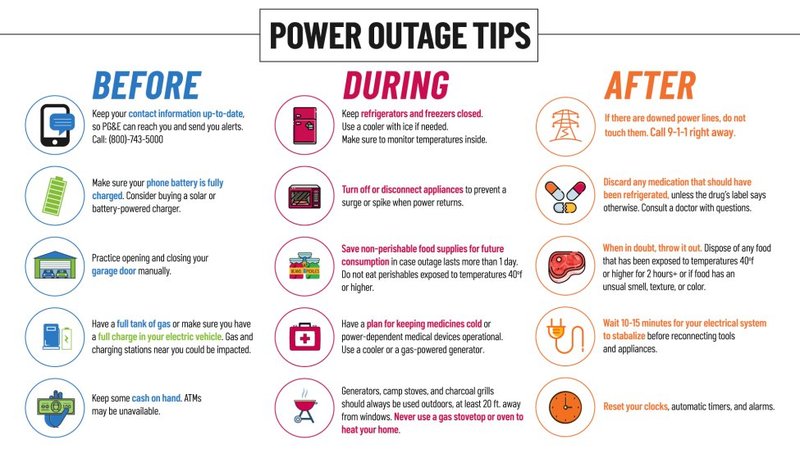
Keep your fridge and freezer doors closed as much as possible. Each peek lets out cold air and brings food closer to the danger zone. Remember: Your fridge can keep food cold for about four hours, the freezer up to 48 hours if it’s full (24 if half full). If in doubt, toss anything that smells or looks off.
Also, avoid using gas stoves, grills, or generators inside your home to prevent carbon monoxide buildup. And just a side note—if you’re using a generator, make sure you know the code for your building or the rules in your neighborhood association.
Keeping Your Devices and Essentials Powered
When the power’s out, suddenly that old battery stash becomes your best friend. Start by grabbing all your battery-powered devices—flashlights, radios, and yes, even TV remotes in case you need them for something else (maybe your soundbar if you’re bored).
Charge your phone if you can, using a portable charger or power bank. Don’t have one? Car chargers are a lifesaver in a pinch. You can always sit in your car for a few minutes with the AC running while your phone charges—just open the garage door or do this outside to stay safe.
If you’ve got smart home gadgets, universal remotes, or anything that syncs over Wi-Fi, don’t sweat it. When the power comes back, most devices will reset automatically—but it might take a few minutes for everything to sync up again. Write down your Wi-Fi code or any important codes for devices, just in case you need to reconnect manually.
Here’s another tip: If you have a landline, keep an old-school corded phone around. Unlike cordless phones or fancy remotes, these usually work even during an outage.
Food, Water, and Comfort: What to Prioritize
The worst time to plan meals is after your fridge has already gone warm. As soon as the power goes out, think through what needs to be used first. Perishables like milk, meat, or leftovers won’t last long without a working fridge, especially in our warm and humid Charleston summers.
- Eat freezer and fridge foods first. Cook them on a gas stove or grill—outside, of course.
- Stock up on non-perishable snacks like granola bars, canned tuna, or fruit cups. These are your backup plan if the outage drags on.
- Fill pitchers and pots with water early on, especially if you live in an older home with questionable plumbing or are worried about water pressure dropping.
Staying comfortable is about more than just snacks, though. If it’s cold, pile on blankets and wear layers. If it’s hot—and let’s be honest, summer in 29401 is no joke—open windows for a breeze and use battery-powered fans if you have them. You might be surprised how much difference a damp washcloth on your neck can make.
Staying Informed During a Power Outage
One of the most frustrating parts of any outage is the not-knowing. Is it just a branch on a line, or something bigger like a citywide blackout? That’s when battery-powered radios or hand-crank emergency radios become your best friends.
Don’t count on your cell signal—if power is out over a large area, cell towers might be overloaded or out of service. Tune in to local news stations like 94.3 WSC or 102.5 WXLG for live updates. These stations will often share when crews are working and give you the first heads-up when it’s safe to go outside or when schools and businesses are reopening.
If you have internet access on your phone, check Dominion Energy’s outage map or the City of Charleston’s emergency updates page for real-time info. And here’s a small hack: social media, especially local Facebook groups or Twitter, is often faster than official sites for real-world reports from neighbors.
Always keep a list of important numbers handy—stick it to your fridge or keep it in a drawer. Include your utility provider, landlord, and neighbors who might need help or have backup resources, like a generator.
Helping Others and Community Support in 29401
Power outages in Charleston, especially in 29401 with its tight-knit and historic neighborhoods, are a chance to look out for each other. Ask yourself: Do you have elderly neighbors who might need help with troubleshooting a circuit, resetting a remote, or even just having someone check on them?
Reach out. Knock on doors or send a quick text if you can. Sometimes, just knowing someone’s thinking of you is reassuring when the world feels off-kilter. If you have power banks or extra batteries, share them around.
And for families: Use the downtime creatively. Break out board games (not everything has to require a battery or remote!), tell stories by flashlight, or just chat. Sometimes losing Wi-Fi and TV is the perfect excuse to reconnect.
If there’s storm damage, check in with local community groups or places of worship. They often organize help or have information about cooling centers (to escape the heat) or places to get a hot meal.
Preparing for the Next Power Outage
Once the lights flicker back on, you might breathe a sigh of relief—and then promptly forget everything you just learned. But here’s the thing: In 29401, between summer storms and rare winter chills, power outages aren’t one-and-done events.
- Restock your emergency kit. Include fresh batteries, flashlights, non-perishable food, bottled water, and a list of emergency codes or contacts.
- Consider investing in a universal remote with backup batteries for your electronics—especially if you have multiple brands of devices that need to be reset or synced after an outage.
- Write down important information like your Wi-Fi password, device pairing codes, and power company phone numbers. Keep them in a waterproof folder or container.
- Make an outage plan: Know where your breaker box is, how to reset it, and teach family members, too.
You might be wondering, “Is all this extra effort really worth it for just a few hours in the dark?” Honestly, the answer is yes—because being prepared means less stress, less food wasted, and a safer, happier household.
When the Power Comes Back: What To Check and Reset
When the lights suddenly flicker back to life, don’t just flip every switch at once and cheer. Go slow and check things methodically.
First, inspect your kitchen: Open the refrigerator and freezer, and check for any weird smells or thawed food. If anything feels warm or looks suspicious, toss it. Don’t gamble with spoiled food. Next, reset any clocks, alarms, or timers—most of these blink or lose sync after an outage.
Electronics come next. Plug in your TV, sound system, or universal remotes, but turn devices on one at a time. This helps you troubleshoot if something isn’t working right. For smart remotes or anything that needs pairing or a battery change, follow your owner’s manual to reset or re-sync them. It feels tedious, but it prevents headaches later.
Finally, call your utility provider if you spot anything odd—flickering lights, strange noises from outlets, or appliances that won’t reset. Better safe than sorry. And if your internet doesn’t come back, try resetting your router by unplugging it for 30 seconds, then plugging it in again.
If you prepare ahead, stay calm, and check in on neighbors, even the longest outage in zip code 29401 becomes manageable—maybe even a little memorable.
Closing Thoughts: Power Outages Don’t Have to Be a Disaster
Let’s be real—dealing with a power outage in zip code 29401 is never fun, but it doesn’t have to be a total disaster. With a little prep, some smart troubleshooting, and a dash of neighborly spirit, you’ll handle whatever comes your way. Keep those batteries fresh, your favorite candle safely tucked away, and your emergency contacts close. Next time the lights go out, you’ll be ready—not just to survive, but to help your Charleston community shine a little brighter in the dark.

